
Build Chatbot Automations Visually. No Code Required.
Design complete customer journeys for WhatsApp, Instagram, Facebook Messenger, Telegram, and Website Chat. Connect message blocks, evaluate smart conditions, collect live data, and trigger operational actions: all on one interactive map.
7-day free trial with unlimited Total Flow Builder and 10,000 AI tokens included.
 TotalChat/NovaCell Flagships
WhatsApp Trigger
Keywords: iphone, catalog, or Meta Click-to-WhatsApp ad.
NovaCell Flagships
iPhone 16 Pro Max & Galaxy S25 Ultra
Welcome to NovaCell! 📱 Your premier store for next-gen flagship smartphones with official warranty and same-day delivery. What would you like to do?
Select your preferred brand to view pricing and express shipping:
"What phone are you trading in today? (Brand, model, and storage)"
Smart Follow-up: If checkout is incomplete, sends a reminder with a free 45W Fast Charger gift.
- • Apple A18 Pro 3nm
- • Camera Control + Action Button
- • 6.9" Super Retina XDR 120Hz
- • 256GB / 512GB / 1TB
- • Snapdragon 8 Elite + S-Pen
- • 200MP Camera + 100x Space Zoom
- • 6.8" Dynamic AMOLED 2X
- • 512GB Storage
IF battery >= 85% && screen == OK


ONE BUILDER, EVERY CHANNEL
The same visual power across all messaging channels
WhatsApp Business API
Official Meta templates, interactive product catalogs, and quick-reply action buttons.
Instagram Direct
Direct message automation, story reply triggers, and keyword-activated post comment replies.
Facebook Messenger
Interactive carousels, persistent menus, and frictionless capture from Click-to-WhatsApp/Messenger ads.
Telegram
Custom inline keyboards, commands, and broadcast sequences with zero per-message template fees.
Live Webchat Widget
Embeddable widget for your storefront or web app with customizable styling and visitor retention triggers.
Design Conversations by Connecting Visual Blocks
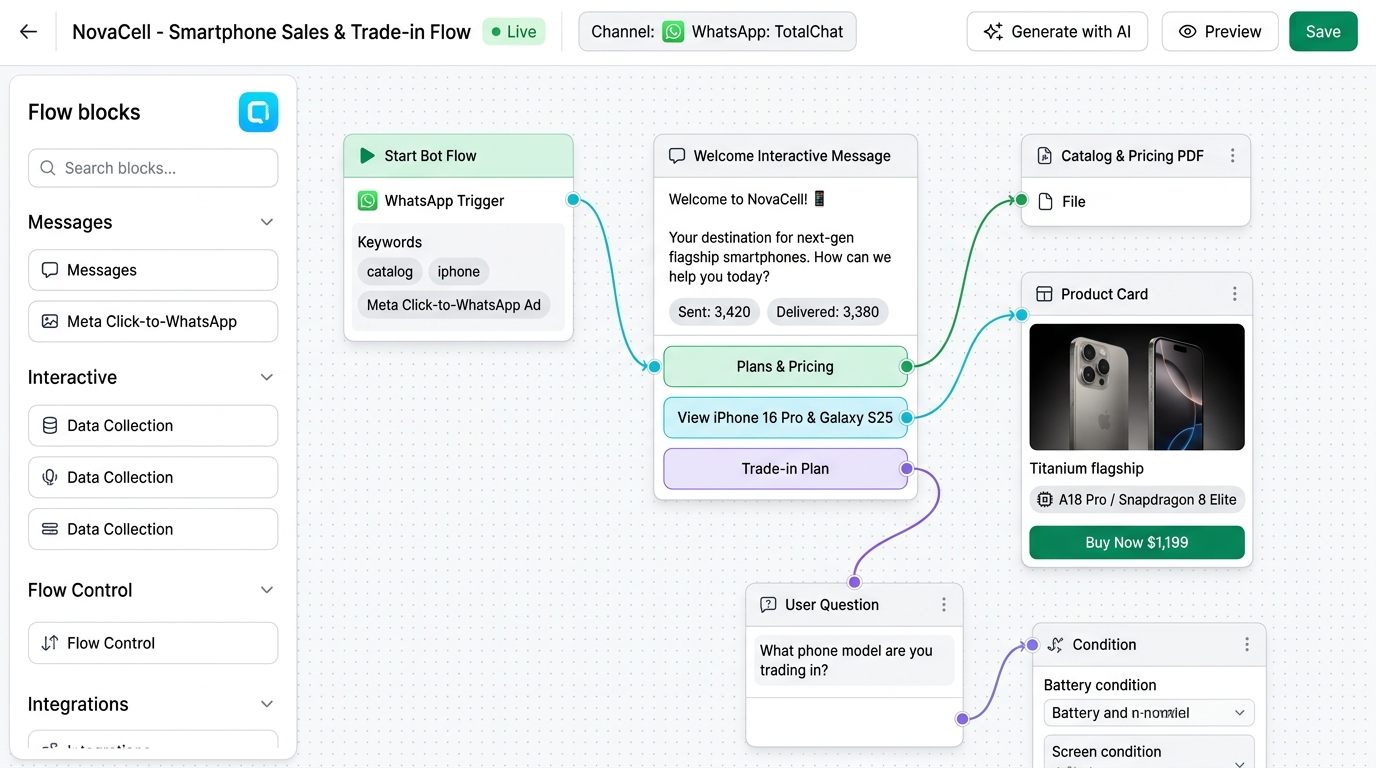
Drag a block from the library, connect the sockets, and save. Look at the real NovaCell flagship smartphone flow: a customer messages on WhatsApp and instantly receives an interactive card with the most sought-after devices (iPhone 16 Pro Max and Galaxy S25 Ultra), high-res imagery, technical specs, and a direct checkout button.
- Unified canvas with interactive product cards, high-res galleries, and express checkout buttons.
- Direct visual connections: each line joins customer choices to the next action without code.
- Real-time metrics on each node: messages sent, delivered, click rates, and completed purchases.
- Integrated simulator to test the smartphone catalog and purchase experience before going live.
Control Different Conversations With Condition Blocks
In a smartphone store, not every shopper has the same budget or intent. A Condition block branches the conversation cleanly: for example, in the Trade-in Plan, if the traded device has battery >= 85% and a flawless screen, a $450 USD VIP credit is approved automatically; otherwise, it routes to manual photo appraisal.
- If / Else branching: VIP trade-in buyers unlock reserved stock while general users browse standard models.
- Concurrent multi-variable evaluation: device model, battery health, and customer budget.
- You configure the rules visually in the node, and the bot executes them transparently with zero hesitation.
- Zero customer friction: the system remembers what the customer shared so they never repeat themselves.

Collect Customer Data While You Chat (User Input Flow)
Turn chat into a high-converting dynamic form for phone sales. The User Input node asks: 'What phone are you trading in today?' or 'Which storage capacity do you need (256GB or 512GB)?' and stores answers automatically into CRM custom fields.
- Automatic storage into custom fields ({tradein_model}, {preferred_storage}, {shipping_city}).
- Real-time syntax validation: phone numbers and postal addresses checked on the fly.
- No external web forms or landing pages where 70% of mobile buyers drop off.
- Data ready immediately for installment payment calculators or human handoff.

Automated Drip Follow-Up Sequences
Purchasing a premium flagship smartphone requires consideration. If a customer views the iPhone 16 Pro Max but leaves without checking out, a scheduled sequence triggers autonomously at +2 hours: '🎁 Complete your order before 6:00 PM today and receive a free 45W Fast Charger + Tempered Glass Screen Protector'.
- Triggered automatically upon abandoned shopping carts or incomplete quotes.
- Precision schedule delays: +15 minutes, +2 hours, Day 2 at 10:00 AM.
- Meta official compliance: direct chat in 24h, verified templates outside the window.
- Intelligent auto-cancellation: the sequence stops automatically the instant payment confirms.

AUTOMATED SEGMENTATION & EXECUTION
Every customer tap triggers immediate actions
Customer clicks do more than advance text: they can update your database, segment subscribers, or trigger your external tech stack.
Add or remove labels
Tag hot leads, VIP buyers, or campaign acquisition sources (e.g. Summer Sale) upon a single tap.
Save custom fields
Store customer name, company, budget, event date, or custom preferences directly on the contact record.
Add to broadcast lists
Maintain clean, organized groups for your upcoming WhatsApp marketing campaigns or product announcements.
Assign conversation in Inbox
Route the chat to a specific team or teammate in the Shared Inbox with internal contextual notes.
Trigger live Webhooks
Send collected customer data to Zapier, Make, or your private backend immediately after a question or button tap.
Call external HTTP APIs
Check warehouse inventory, create ERP order records, or validate coupon codes and display live responses in chat.
Total Flow Builder + AI Agents: Deterministic Control with Open Reasoning
Rigid chatbots break when users ask unexpected questions; unguided AIs may hallucinate. TotalChat combines both worlds into one harmonious system:
Total Flow Builder (The Journey Map)
Absolute funnel control: welcome greetings, budget verification, checkout links, structured data capture, and operational terms.
Specialized AI Agent (The Expert)
Steps in when the customer asks complex questions about catalogs, product specs, or open topics, strictly grounded in your Source of Truth.
Seamless Return & Escalation
Once the AI resolves the inquiry, the user flows back into checkout or is cleanly handed off to a human agent with a summary.
FREQUENTLY ASKED QUESTIONS
Total Flow Builder FAQ
What is Total Flow Builder and how does it work?
Total Flow Builder is a visual no-code drag-and-drop canvas for designing chatbot and automation journeys across WhatsApp, Instagram, Messenger, Telegram, and Webchat. You connect message blocks, condition checks, user input questions, and actions by pulling simple socket lines.
Is Total Flow Builder included in all plans?
Yes! Total Flow Builder is available across 100% of TotalChat plans, starting with the 7-day Free Trial and individual WhatsApp API plan up to the team plans (Standard, Pro, Enterprise, and Unlimited).
Do I need to know how to code?
No coding required at all. The entire building experience is 100% visual. Drag a block from the library, connect lines with your mouse, and double-click to compose messages or configure actions.
Can I collect customer data without external form tools?
Yes. With User Input Flow blocks, you can ask sequential questions (name, email, phone, budget) and save every answer into custom CRM fields on the contact record without redirects.
How do automated follow-up sequences (Drip Campaigns) work?
A sequence is a chain of scheduled messages. You define delays in minutes, hours, or days. Within 24 hours, standard messages are delivered; outside the window, official approved WhatsApp templates are used. If the customer converts, the sequence stops automatically.
Can different customers get different conversation paths?
Absolutely. Condition blocks let you evaluate labels, fields, or answers to split the conversation: VIPs receive fast-track service, returning buyers check order status, and new leads are guided through qualification.
How does Total Flow Builder work with AI Agents?
Use Total Flow Builder for structured paths (welcome menus, fixed options, checkout) and drop an AI Agent node when customers ask open-ended or technical questions, preserving context and returning to the flow when completed.
Can I hand off a chat to a live human agent?
Yes. Add a 'Talk to Human' or assign block. The bot pauses and opens the conversation in the Shared Inbox with full chat history, tags, and internal notes intact.
Ready to stop losing sales to slow replies?
Book a guided demo or talk directly with our team of specialists.
✨ Sign up in 30 seconds • 7-day free trial • No credit card required